See Jeos in action
Upload a document set, choose the job you want Jeos to do, and get a structured analysis that traces findings back to the source documents.
Upload your documents
Add two or more supported files in the same run. You can mix PDF, Word, Excel, PowerPoint, HTML, text and common image formats.
Choose what you need to check
Use a specialist Jeos tool for a specific task, or use the main Compare workspace with a built-in or user-defined prompt.
Review the findings
Jeos compares the documents together and highlights the gaps, conflicts, requirements, changes, responsibilities or other issues relevant to the task.
Export or save the result
Export reports to PDF or Word. Specialist tools can also provide structured Excel outputs such as registers and matrices. Save results to Jeos if you want to reopen them later.
Choose the review you actually need
The specialist tools use the same Jeos document-analysis engine, but each one is designed around a specific project or commercial task.
Before you sign
Contract Risk Finder, Tender Compliance Checker and Scope Gap Finder.
Before you start
Requirements Checker and Responsibility Matrix Builder.
While you deliver
Document Conflict Finder, Change & Variation Finder and Deliverables Checker.
Before handover
Handover Completeness Checker and Acceptance Criteria Checker.
What a Jeos report looks like
This excerpt comes from a multi-document comparison across a contract, an amendment, a deliverables register and supporting project documents.
Analysis Report
Abbreviated excerptExecutive Summary
A cross-document comparison identified multiple material inconsistencies across the uploaded records. The most significant issues concern:
- Liability exposure — [agreement.docx] and [kickoff.pptx] state a $50,000 liability cap, while [amendment.pdf] increases the cap to $75,000.
- Support acknowledgment SLA — [deliverables.xlsx] requires acknowledgment within 2 business hours, whereas [agreement.docx], [kickoff.pptx], and [policy.html] state 4 business hours.
- Termination / renewal notice — [agreement.docx] uses a 60-day notice tied to auto-renewal, while [amendment.pdf] changes this to 90 days' written notice and uses broader termination wording.
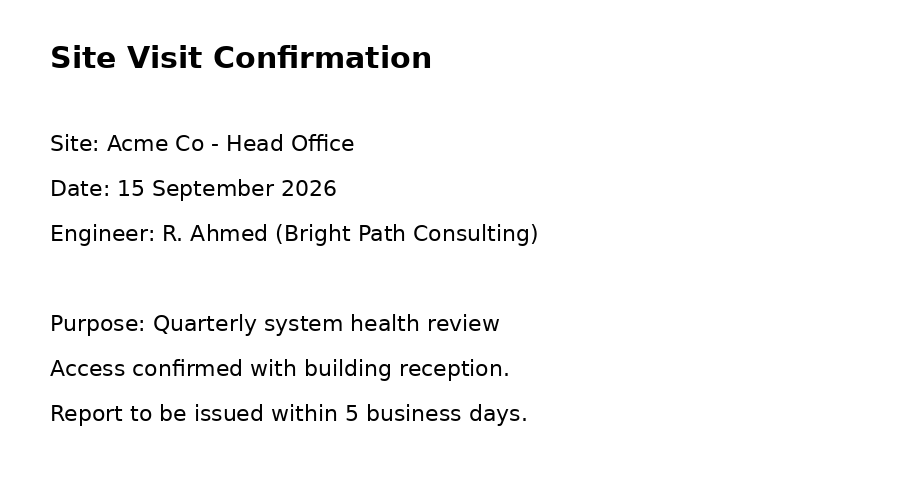
- Quarterly review timing — [kickoff.pptx] identifies the next review date as 1 December 2026, but [sitevisit.png] records a quarterly system health review on 15 September 2026.
- Amendment effectiveness ambiguity — [amendment.pdf] says changes are effective "from the date below," but no effective date is provided in the supplied text, leaving the operative date of revised terms unclear.
In addition, several lower-severity scope and interpretation risks exist, including added scope detail in [deliverables.xlsx] not reflected in the contract baseline, undefined document hierarchy, and missing definitions for schedule cadence and contractual precedence.
Conflicts & Discrepancies
High Severity
1. Liability cap conflict: $50,000 vs $75,000
- Documents involved: [agreement.docx], [amendment.pdf], [kickoff.pptx]
-
Conflicting excerpts:
- [agreement.docx]: "The Supplier's total liability under this agreement shall not exceed $50,000 in any 12-month period."
- [amendment.pdf]: "The Supplier's total liability is increased to $75,000 in any 12-month period."
- [kickoff.pptx]: "Liability cap agreed at kickoff: $50,000 per 12-month period"
- Description of inconsistency: The liability cap is stated as $50,000 in [agreement.docx] and [kickoff.pptx], but $75,000 in [amendment.pdf].
- Why this matters: Liability cap language directly affects financial risk allocation, insurance alignment, reserve calculations, claim strategy, and approval authority. A $25,000 difference is material.
- Issue type: Direct
- Apparent controlling / more specific / newer text: [amendment.pdf] appears newer and more specific than [agreement.docx] because it expressly states that it updates the original agreement. Relative priority versus [kickoff.pptx] cannot be confirmed from the text alone, although a formal amendment would ordinarily appear more authoritative than a kickoff summary.
This is 1 of 8 findings
The full report also covers the support SLA, termination, payment terms, scheduling conflicts, scope risks, gap analysis and recommendations.
Some results are made to be worked with, not just read
Specialist tools can turn findings into structured Excel outputs such as requirements registers, tender compliance matrices, change registers, deliverables registers and responsibility matrices.
The report remains available for context and explanation, while the Excel output gives your team a practical register they can filter, review and action.